
Examples
The pipeline’s repository has eleven example specs in examples/. CI builds and boots every one of them on each change to the pipeline, so each is a spec known to work at v0.9.1. Copy the one closest to what you want and change it.
Their art is in examples/assets/, so the paths in them start with assets/.
| Spec | Distro | Base | Desktop | What it shows |
|---|---|---|---|---|
testos-ubuntu.yaml |
TestOS | Ubuntu 26.04 | GNOME | Every kind of extra: a package, a file, all three kinds of script and a GitHub repo |
testos-fedora.yaml |
TestOS | Fedora 44 | KDE Plasma | The same extras on Fedora |
lawndarts-ubuntu.yaml |
Lawn Darts Linux | Ubuntu 26.04 | Cinnamon | A boot splash of its own, and a pinned dock |
lawndarts-fedora.yaml |
Lawn Darts Linux | Fedora 44 | Cinnamon | The same boot splash on Fedora |
settings-ubuntu.yaml |
Aula Linux | Ubuntu 26.04 | GNOME | Every setting, in Spanish: computer name, automatic login, hidden entries, the dock, Firefox’s home page and a bookmark, and saving to the USB stick |
settings-fedora.yaml |
Werkbank Linux | Fedora 44 | KDE Plasma | Settings in German, a Flathub app, a dock with the Flathub app first, and Firefox’s home page |
settings-cinnamon.yaml |
Varanda Linux | Fedora 44 | Cinnamon | Settings in Brazilian Portuguese, a Flathub app and a dock on Cinnamon |
kiosk-ubuntu.yaml |
Borne Linux | Ubuntu 26.04 | GNOME underneath | A Firefox kiosk in French, on its home page with bookmarks |
kiosk-fedora.yaml |
Gioco Linux | Fedora 44 | KDE underneath | A GCompris kiosk in Italian, which needs no network |
macvm-ubuntu.yaml |
TestOS ARM | Ubuntu 26.04 | GNOME | An ISO for ARM virtual machines only (arches: [arm64]) |
macvm-fedora.yaml |
TestOS ARM | Fedora 44 | KDE Plasma | The same on Fedora |
CI publishes only the TestOS and Lawn Darts ISOs, which linuxlive.com offers for download. The others exist to prove the settings, kiosk mode and ARM builds in running systems.
Lawn Darts Linux on Ubuntu
Section titled “Lawn Darts Linux on Ubuntu”A small distro with a boot splash and a dock of its own. The splash’s script and images come from the pipeline’s make_splash_example.py; Boot splash walks through a script like it.
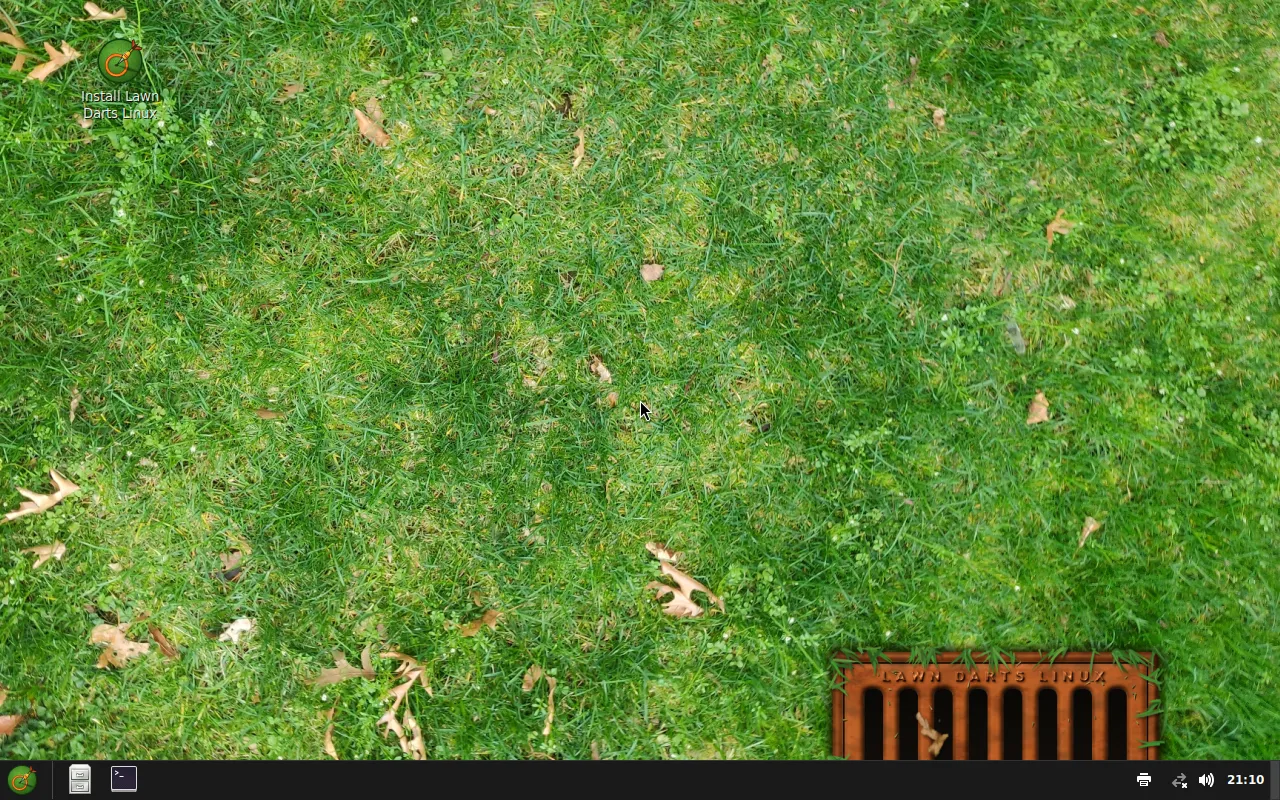
# Example spec: Lawn Darts Linux, Ubuntu 26.04 with Cinnamon. CI builds this one and boots it.# The art comes from scripts/make_lawndarts_assets.py; see assets/lawndarts/CREDITS.md.schema_version: 1name: Lawn Darts Linuxversion: "0.1"base: ubuntudesktop: cinnamonapps: - firefox - vlcbranding: wallpaper: assets/lawndarts/wallpaper.png logo: assets/lawndarts/logo.png accent_color: "#e0661f" # A boot splash of its own (since v0.9.0): see scripts/make_splash_example.py. splash: script: assets/lawndarts/splash/lawndarts.script images: - assets/lawndarts/splash/dart.png - assets/lawndarts/splash/bar.png - assets/lawndarts/splash/bar-bg.pngsettings: # Pinned to the panel after the file manager (since v0.9.0). dock: - vlc - firefoxThere is no id, so it is made from the name: lawn-darts-linux. The accent colour has no effect on Cinnamon, which has no accent setting, but on Ubuntu it still colours the text-mode boot splash. The panel shows Nemo, then VLC, then Firefox.
The Lawn Darts wallpaper is a public domain photo of a lawn; its sources are listed in examples/assets/lawndarts/CREDITS.md.
Aula Linux
Section titled “Aula Linux”A classroom distro for Spanish schools. It sets every setting on Ubuntu with GNOME and keeps changes on the USB stick.
# Example spec: Ubuntu 26.04 with GNOME, set up for a Spanish classroom. CI# builds and boots it to check every setting: language, keyboard, time zone,# computer name, automatic login, hidden menu entries and Firefox's policies,# and that files and settings are saved back to the USB stick.schema_version: 1name: Aula Linuxversion: "0.1"base: ubuntudesktop: gnomeapps: - firefoxbranding: wallpaper: assets/wallpaper.png logo: assets/logo.png accent_color: "#c2185b"settings: language: es_ES keyboard: es timezone: Europe/Madrid hostname: aula-1 autologin: true hidden_apps: - org.gnome.Yelp - org.gnome.Ptyxis # Pinned to the dock after the file manager (since v0.9.0). dock: - firefox# Save files and settings on the USB stick (Ubuntu only, since v0.7.0).persistence: truefirefox: homepage: https://linuxlive.com/ bookmarks: - name: linuxlive Library url: https://linuxlive.com/library/Things to notice:
hidden_appsuses desktop file names. On Ubuntu 26.04, Help isorg.gnome.Yelpand the terminal isorg.gnome.Ptyxis.persistence: trueonly works on Ubuntu. Changebasetofedoraand the check refuses it.firefoxneedsfirefoxinapps.
The others in brief
Section titled “The others in brief”TestOS (testos-ubuntu.yaml, testos-fedora.yaml) adds htop from the base’s archive, copies assets/extras/motd to /etc/motd, runs a build, a first-boot and a first-login script from assets/extras/, and installs a file from a pinned commit of the linuxlive repository:
repos: - url: https://github.com/Eric-Ness/linuxlive commit: 7de84ed49850a29bc2fce32d66d0d83509b99daf run: install -Dm644 LICENSE /usr/share/doc/linuxlive-example/LICENSEWerkbank Linux (settings-fedora.yaml) pins a Flathub app before a catalog app, which shows that dock takes ids from both lists:
flathub: - org.kde.kcalcsettings: dock: - org.kde.kcalc - firefoxBorne Linux (kiosk-ubuntu.yaml) is a Firefox kiosk. desktop: gnome is still required: the Install boot entry starts it so the installer can run.
kiosk: app: firefoxTestOS ARM (macvm-*.yaml) sets id: testos-arm and arches: [arm64], so it builds only the ARM ISO. Its apps, Firefox and VLC, are both built for ARM on Flathub.
The TestOS art is drawn by scripts/make_test_assets.py in the pipeline’s repository.